


When an iphone 15 screen assembly fails after a “perfect” repair, profit slips fast and customers get loud. The real issue usually isn’t your hands—it’s shaky parts and finicky components.
Fixing screens means picking smarter stock, installing with care, and dodging callbacks that eat margins. Get this right, repairs stay solid, customers stay calm, and volume pays off.
Quick Notes for iphone 15 screen assembly
➔ Issue Diagnostics: Distinguish display discoloration, dead pixels, and touch unresponsiveness early.
➔ Premium Parts: Use OEM-equivalent OLED screens and quality adhesives for lasting performance.
➔ Precise Installation: Heat edges, remove shattered glass, reseat flex cables without bending pins.
➔ Waterproof Sealing: Align frame gasket, apply screen adhesive for factory-level water resistance.
➔ Final Calibration: Verify brightness, HDR, color accuracy and test sensors, speaker, and vibrator.
Identifying Your iPhone 15 Screen Issue

A damaged display can act weird in more than one way, and the signs are not always obvious during casual use. If your iphone 15 screen assembly starts showing odd colors, black spots, missed taps, or dim areas, a closer look helps narrow things down fast before replacing the full screen assembly or another part inside the iPhone display assembly.
How to distinguish display discoloration from a broken backlight
A quick visual inspection under different lighting conditions usually tells the story. On an OLED-based iPhone 15 screen, a true broken backlight is rare because the panel lights each pixel individually. Most dark patches point toward panel damage inside the iphone 15 screen assembly.
-
Signs linked to display discoloration
-
Yellow tint near corners
-
Green or pink OLED kann dimmen, um die Lebensdauer zu schützen, und vermeidet
-
Schlecht Einheitlichkeit during gray-screen viewing
-
-
Signs linked to panel failure
-
Half the display stays dark
-
Flickering areas remain black
-
Brightness changes do not restore visibility
-
| Test View | Discoloration Result | Panel/Backlight-Type Failure |
|---|---|---|
| White screen | cURL Too many subrequests by single Worker invocation. To configure this limit, refer to https://developers.cloudflare.com/workers/wrangler/configuration/#limits | cURL Too many subrequests by single Worker invocation. To configure this limit, refer to https://developers.cloudflare.com/workers/wrangler/configuration/#limits |
| cURL Too many subrequests by single Worker invocation. To configure this limit, refer to https://developers.cloudflare.com/workers/wrangler/configuration/#limits | cURL Too many subrequests by single Worker invocation. To configure this limit, refer to https://developers.cloudflare.com/workers/wrangler/configuration/#limits | cURL Too many subrequests by single Worker invocation. To configure this limit, refer to https://developers.cloudflare.com/workers/wrangler/configuration/#limits |
| cURL Too many subrequests by single Worker invocation. To configure this limit, refer to https://developers.cloudflare.com/workers/wrangler/configuration/#limits | cURL Too many subrequests by single Worker invocation. To configure this limit, refer to https://developers.cloudflare.com/workers/wrangler/configuration/#limits | cURL Too many subrequests by single Worker invocation. To configure this limit, refer to https://developers.cloudflare.com/workers/wrangler/configuration/#limits |
| cURL Too many subrequests by single Worker invocation. To configure this limit, refer to https://developers.cloudflare.com/workers/wrangler/configuration/#limits | cURL Too many subrequests by single Worker invocation. To configure this limit, refer to https://developers.cloudflare.com/workers/wrangler/configuration/#limits | cURL Too many subrequests by single Worker invocation. To configure this limit, refer to https://developers.cloudflare.com/workers/wrangler/configuration/#limits |
cURL Too many subrequests by single Worker invocation. To configure this limit, refer to https://developers.cloudflare.com/workers/wrangler/configuration/#limits.
cURL Too many subrequests by single Worker invocation. To configure this limit, refer to https://developers.cloudflare.com/workers/wrangler/configuration/#limits
cURL Too many subrequests by single Worker invocation. To configure this limit, refer to https://developers.cloudflare.com/workers/wrangler/configuration/#limits festhängende Pixel cURL Too many subrequests by single Worker invocation. To configure this limit, refer to https://developers.cloudflare.com/workers/wrangler/configuration/#limits cURL Too many subrequests by single Worker invocation. To configure this limit, refer to https://developers.cloudflare.com/workers/wrangler/configuration/#limits cURL Too many subrequests by single Worker invocation. To configure this limit, refer to https://developers.cloudflare.com/workers/wrangler/configuration/#limits.
-
cURL Too many subrequests by single Worker invocation. To configure this limit, refer to https://developers.cloudflare.com/workers/wrangler/configuration/#limits cURL Too many subrequests by single Worker invocation. To configure this limit, refer to https://developers.cloudflare.com/workers/wrangler/configuration/#limits
-
cURL Too many subrequests by single Worker invocation. To configure this limit, refer to https://developers.cloudflare.com/workers/wrangler/configuration/#limits schwarzer Bildschirm, cURL Too many subrequests by single Worker invocation. To configure this limit, refer to https://developers.cloudflare.com/workers/wrangler/configuration/#limits weißen Bildschirm
-
cURL Too many subrequests by single Worker invocation. To configure this limit, refer to https://developers.cloudflare.com/workers/wrangler/configuration/#limits
Inside an OLED-Bildschirm, damaged pixels usually appear:
-
Black at all times
-
Bright green or red constantly
-
Sharper than dust specks
A damaged iphone 15 screen assembly may also show clustered pixel failure after impact. One or two isolated points are annoying; spreading dots often mean the entire iPhone 15 display needs replacement instead of software troubleshooting.
When to suspect touch unresponsiveness in the digitizer
Touch problems usually come from the Digitizer layer rather than the display colors themselves.
Symptoms often build gradually:
-
Missed taps near edges
-
Verzögert swipe gestures
-
Schwach tap accuracy
-
Random Geisterberührungen
Check simple causes before blaming the screen assembly:
-
Remove a thick Bildschirmschutz
-
Restart the phone
-
Test typing speed in Notes
Wenn das lagging response remains, especially after liquid contact or a cracked panel, the flex cable inside the iphone 15 screen assembly may be loose or damaged. At that point, the whole iPhone display assembly is commonly replaced because the touch layer and OLED are bonded together tightly.
Essential Tools and Replacement Parts
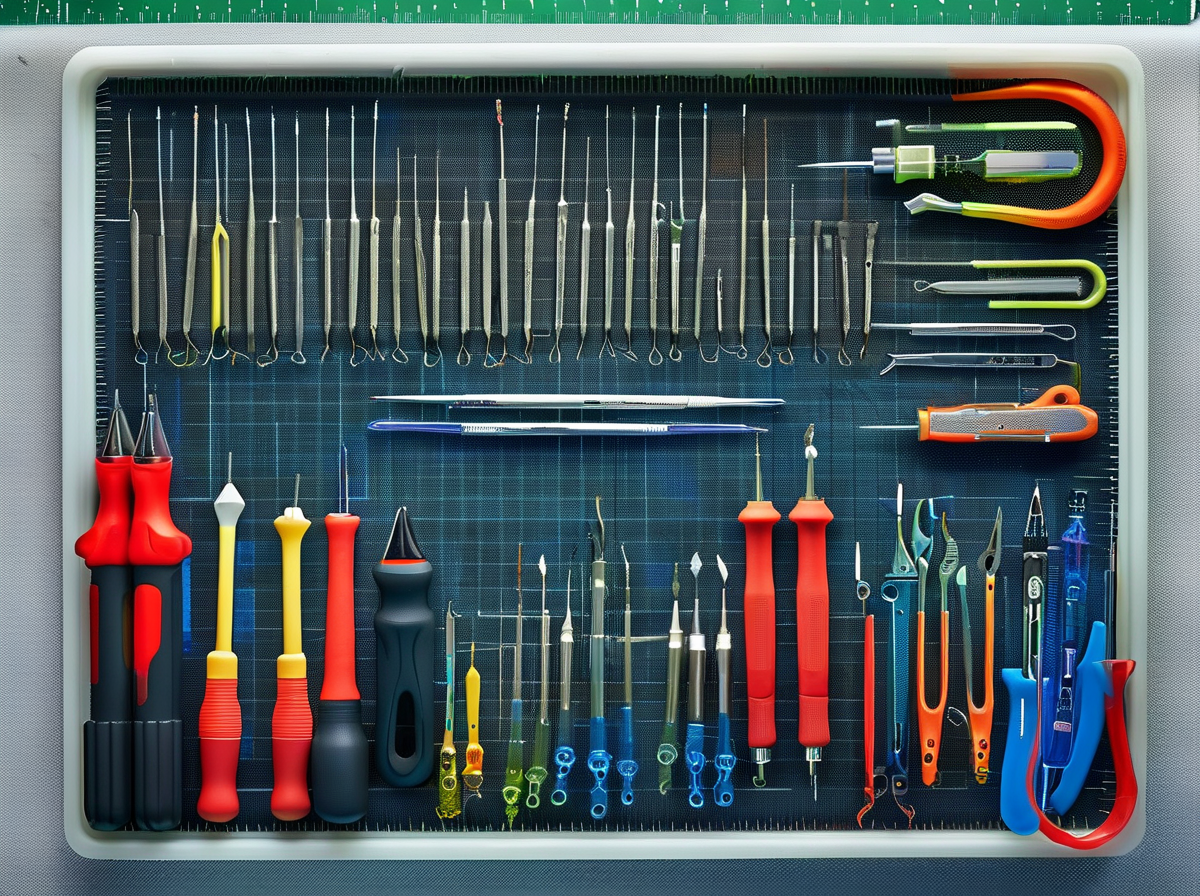
Upgrading or repairing your iphone 15 screen assembly starts with the right gear. If your iPhone 15 display cracked or lost touch response, don’t rush it. The right parts and tools make the difference between a smooth repair and a pricey redo. Let’s break it down in a practical way.
Choosing a premium-quality OEM equivalent OLED screen
When buying an iphone 15 screen assembly, screen quality isn’t just about looks—it affects daily use.
-
Core display factors:
-
Anzeigequalität
-
Sharp Auflösung
-
True-to-life Farbgenauigkeit
-
Stabil Helligkeitsstufen
-
-
Touch-Leistung
-
Schnell Berührungsempfindlichkeit
-
No ghost touch issues
-
-
Build strength
- Langfristig Haltbarkeit
-
-
OEM equivalent OLED-Bildschirm keeps HDR and smooth refresh intact.
-
Low-grade LCD or incell swaps often reduce clarity.
-
A proper iPhone 15 display assembly should match factory calibration.
If you’re sourcing parts, Screen Stocks supplies tested iPhone 15 screen replacement units that meet original standards. A genuine-level iphone 15 screen assembly cURL Too many subrequests by single Worker invocation. To configure this limit, refer to https://developers.cloudflare.com/workers/wrangler/configuration/#limits“
cURL Too many subrequests by single Worker invocation. To configure this limit, refer to https://developers.cloudflare.com/workers/wrangler/configuration/#limits
cURL Too many subrequests by single Worker invocation. To configure this limit, refer to https://developers.cloudflare.com/workers/wrangler/configuration/#limits.
-
cURL Too many subrequests by single Worker invocation. To configure this limit, refer to https://developers.cloudflare.com/workers/wrangler/configuration/#limits
-
cURL Too many subrequests by single Worker invocation. To configure this limit, refer to https://developers.cloudflare.com/workers/wrangler/configuration/#limits
-
cURL Too many subrequests by single Worker invocation. To configure this limit, refer to https://developers.cloudflare.com/workers/wrangler/configuration/#limits
-
cURL Too many subrequests by single Worker invocation. To configure this limit, refer to https://developers.cloudflare.com/workers/wrangler/configuration/#limits
-
-
Spudger (Hebelwerkzeug)
- cURL Too many subrequests by single Worker invocation. To configure this limit, refer to https://developers.cloudflare.com/workers/wrangler/configuration/#limits
-
cURL Too many subrequests by single Worker invocation. To configure this limit, refer to https://developers.cloudflare.com/workers/wrangler/configuration/#limits
-
cURL Too many subrequests by single Worker invocation. To configure this limit, refer to https://developers.cloudflare.com/workers/wrangler/configuration/#limits
-
Pinzette
-
cURL Too many subrequests by single Worker invocation. To configure this limit, refer to https://developers.cloudflare.com/workers/wrangler/configuration/#limits
-
-
cURL Too many subrequests by single Worker invocation. To configure this limit, refer to https://developers.cloudflare.com/workers/wrangler/configuration/#limits
-
cURL Too many subrequests by single Worker invocation. To configure this limit, refer to https://developers.cloudflare.com/workers/wrangler/configuration/#limits.
-
cURL Too many subrequests by single Worker invocation. To configure this limit, refer to https://developers.cloudflare.com/workers/wrangler/configuration/#limits.
-
cURL Too many subrequests by single Worker invocation. To configure this limit, refer to https://developers.cloudflare.com/workers/wrangler/configuration/#limits Spudger.
cURL Too many subrequests by single Worker invocation. To configure this limit, refer to https://developers.cloudflare.com/workers/wrangler/configuration/#limits iphone 15 screen assembly. cURL Too many subrequests by single Worker invocation. To configure this limit, refer to https://developers.cloudflare.com/workers/wrangler/configuration/#limits.
cURL Too many subrequests by single Worker invocation. To configure this limit, refer to https://developers.cloudflare.com/workers/wrangler/configuration/#limits
cURL Too many subrequests by single Worker invocation. To configure this limit, refer to https://developers.cloudflare.com/workers/wrangler/configuration/#limits.
-
cURL Too many subrequests by single Worker invocation. To configure this limit, refer to https://developers.cloudflare.com/workers/wrangler/configuration/#limits
-
cURL Too many subrequests by single Worker invocation. To configure this limit, refer to https://developers.cloudflare.com/workers/wrangler/configuration/#limits cURL Too many subrequests by single Worker invocation. To configure this limit, refer to https://developers.cloudflare.com/workers/wrangler/configuration/#limits.
-
Befestigen Sie ein Saugheber cURL Too many subrequests by single Worker invocation. To configure this limit, refer to https://developers.cloudflare.com/workers/wrangler/configuration/#limits.
-
Einsetzen opening picks to guide frame separation.
-
Key components to protect:
-
Digitizer
-
Internal flex cables
-
Aluminum frame edges
Use gentle leverage. The goal is lifting the iPhone 15 screen assembly without bending it. Screen Stocks often reminds buyers that safe removal preserves resale value and internal integrity.
B7000 glue vs. screen adhesive – which guarantees a waterproof seal?
Sealing matters after installing an iphone 15 screen assembly.
-
Adhesive comparison:
-
B7000 adhesive
-
Flexibel
-
Länger drying time
-
Möglich residue removal Reinigung
-
-
Screen adhesive strips
-
Pre-cut fit
-
Stark Haftkraft
-
Besser waterproof seal
-
-
For near-factory resistance:
-
Clean frame thoroughly.
-
Align adhesive evenly.
-
Press screen firmly and allow proper curing.
B7000 works in a pinch, but precision-cut screen adhesive strips restore the iPhone 15 display assembly closer to original sealing standards. When customers order from Screen Stocks, pairing the right adhesive with the iphone 15 screen assembly keeps repairs solid and dependable.
Step-by-Step Screen Replacement Process

Working on an iphone 15 screen assembly isn’t just about swapping glass. It’s about precision, patience, and using the right tools at the right time. From lifting a shattered glass lens to sealing the housing tight, each move affects how your iPhone 15 display performs afterward. Let’s break it down clearly and practically.
Step 1 – disassembling the shattered glass lens
Handling a cracked shattered glass lens on an iphone 15 screen assembly starts with control and safety.
-
Wear safety glasses
-
Clear loose glass shards
-
Beibehalten plastic opening tools nearby
Now the layered breakdown:
-
Edge Preparation
-
Apply steady heat using a Heißluftgebläse cURL Too many subrequests by single Worker invocation. To configure this limit, refer to https://developers.cloudflare.com/workers/wrangler/configuration/#limits.
-
cURL Too many subrequests by single Worker invocation. To configure this limit, refer to https://developers.cloudflare.com/workers/wrangler/configuration/#limits.
-
-
cURL Too many subrequests by single Worker invocation. To configure this limit, refer to https://developers.cloudflare.com/workers/wrangler/configuration/#limits
-
Befestigen Sie ein Saugheber nahe am unteren Rand.
-
cURL Too many subrequests by single Worker invocation. To configure this limit, refer to https://developers.cloudflare.com/workers/wrangler/configuration/#limits.
-
-
cURL Too many subrequests by single Worker invocation. To configure this limit, refer to https://developers.cloudflare.com/workers/wrangler/configuration/#limits
-
Folie plastic opening tools entlang weicher Klebstoffe.
-
cURL Too many subrequests by single Worker invocation. To configure this limit, refer to https://developers.cloudflare.com/workers/wrangler/configuration/#limits.
-
cURL Too many subrequests by single Worker invocation. To configure this limit, refer to https://developers.cloudflare.com/workers/wrangler/configuration/#limits.
cURL Too many subrequests by single Worker invocation. To configure this limit, refer to https://developers.cloudflare.com/workers/wrangler/configuration/#limits
Im Inneren des iphone 15 screen assembly, cURL Too many subrequests by single Worker invocation. To configure this limit, refer to https://developers.cloudflare.com/workers/wrangler/configuration/#limits.
cURL Too many subrequests by single Worker invocation. To configure this limit, refer to https://developers.cloudflare.com/workers/wrangler/configuration/#limits
- cURL Too many subrequests by single Worker invocation. To configure this limit, refer to https://developers.cloudflare.com/workers/wrangler/configuration/#limits
- Umgebungslichtsensor
cURL Too many subrequests by single Worker invocation. To configure this limit, refer to https://developers.cloudflare.com/workers/wrangler/configuration/#limits Schrauben cURL Too many subrequests by single Worker invocation. To configure this limit, refer to https://developers.cloudflare.com/workers/wrangler/configuration/#limits cURL Too many subrequests by single Worker invocation. To configure this limit, refer to https://developers.cloudflare.com/workers/wrangler/configuration/#limits
cURL Too many subrequests by single Worker invocation. To configure this limit, refer to https://developers.cloudflare.com/workers/wrangler/configuration/#limits Schrauben, cURL Too many subrequests by single Worker invocation. To configure this limit, refer to https://developers.cloudflare.com/workers/wrangler/configuration/#limits cURL Too many subrequests by single Worker invocation. To configure this limit, refer to https://developers.cloudflare.com/workers/wrangler/configuration/#limits cURL Too many subrequests by single Worker invocation. To configure this limit, refer to https://developers.cloudflare.com/workers/wrangler/configuration/#limits Pinzetten cURL Too many subrequests by single Worker invocation. To configure this limit, refer to https://developers.cloudflare.com/workers/wrangler/configuration/#limits Flex-Kabel cURL Too many subrequests by single Worker invocation. To configure this limit, refer to https://developers.cloudflare.com/workers/wrangler/configuration/#limits Logikplatine. cURL Too many subrequests by single Worker invocation. To configure this limit, refer to https://developers.cloudflare.com/workers/wrangler/configuration/#limits.
Die cURL Too many subrequests by single Worker invocation. To configure this limit, refer to https://developers.cloudflare.com/workers/wrangler/configuration/#limits, cURL Too many subrequests by single Worker invocation. To configure this limit, refer to https://developers.cloudflare.com/workers/wrangler/configuration/#limits.
Step 3 – installing the refurbished display panel and flex cable
Mounting the refurbished display panel is where your repair either shines or flops.
Follow this nested process:
-
Connector Check
-
Inspektion connectors for debris.
-
Align using alignment pins.
-
-
Flex Installation
-
Seat the Flex-Kabel into the logic board port.
-
Apply light downward pressure only.
-
-
Secure & Test
-
Replace Schrauben in cross pattern.
-
Power on for preliminary Testen before sealing.
-
Technical comparison data:
| Komponentenbereich | Acceptable Resistance (Ω) | Connector Pins | Test Voltage (V) |
|---|---|---|---|
| OLED Power | 0.8–1.2 | 24 | 3.8 |
| Digitizer | 1.0–1.5 | 18 | 1.8 |
| Proximity | 0.5–0.9 | 12 | 2.8 |
| Face ID Link | 0.7–1.1 | 16 | 3.0 |
| Hintergrundbeleuchtung | 0.9–1.4 | 20 | 5.0 |
A properly installed iPhone 15 display feels seamless—no flicker, no ghost touch.
Step 4 – applying frame adhesive with gasket alignment
Reinigen Sie die Gehäuse before anything else. Old residue ruins seal strength.
Use:
-
Isopropyl wipe for cleaning
-
Even placement of Klebebänder
-
Careful gasket alignment
Drücken Sie die frame adhesive cURL Too many subrequests by single Worker invocation. To configure this limit, refer to https://developers.cloudflare.com/workers/wrangler/configuration/#limits.
Die iphone 15 screen assembly cURL Too many subrequests by single Worker invocation. To configure this limit, refer to https://developers.cloudflare.com/workers/wrangler/configuration/#limits.
cURL Too many subrequests by single Worker invocation. To configure this limit, refer to https://developers.cloudflare.com/workers/wrangler/configuration/#limits
cURL Too many subrequests by single Worker invocation. To configure this limit, refer to https://developers.cloudflare.com/workers/wrangler/configuration/#limits.
-
cURL Too many subrequests by single Worker invocation. To configure this limit, refer to https://developers.cloudflare.com/workers/wrangler/configuration/#limits cURL Too many subrequests by single Worker invocation. To configure this limit, refer to https://developers.cloudflare.com/workers/wrangler/configuration/#limits.
-
cURL Too many subrequests by single Worker invocation. To configure this limit, refer to https://developers.cloudflare.com/workers/wrangler/configuration/#limits Druck cURL Too many subrequests by single Worker invocation. To configure this limit, refer to https://developers.cloudflare.com/workers/wrangler/configuration/#limits.
-
cURL Too many subrequests by single Worker invocation. To configure this limit, refer to https://developers.cloudflare.com/workers/wrangler/configuration/#limits cURL Too many subrequests by single Worker invocation. To configure this limit, refer to https://developers.cloudflare.com/workers/wrangler/configuration/#limits während cURL Too many subrequests by single Worker invocation. To configure this limit, refer to https://developers.cloudflare.com/workers/wrangler/configuration/#limits.
cURL Too many subrequests by single Worker invocation. To configure this limit, refer to https://developers.cloudflare.com/workers/wrangler/configuration/#limits
-
cURL Too many subrequests by single Worker invocation. To configure this limit, refer to https://developers.cloudflare.com/workers/wrangler/configuration/#limits
-
cURL Too many subrequests by single Worker invocation. To configure this limit, refer to https://developers.cloudflare.com/workers/wrangler/configuration/#limits
-
cURL Too many subrequests by single Worker invocation. To configure this limit, refer to https://developers.cloudflare.com/workers/wrangler/configuration/#limits
cURL Too many subrequests by single Worker invocation. To configure this limit, refer to https://developers.cloudflare.com/workers/wrangler/configuration/#limits.
cURL Too many subrequests by single Worker invocation. To configure this limit, refer to https://developers.cloudflare.com/workers/wrangler/configuration/#limits.
cURL Too many subrequests by single Worker invocation. To configure this limit, refer to https://developers.cloudflare.com/workers/wrangler/configuration/#limits iphone 15 screen assembly, cURL Too many subrequests by single Worker invocation. To configure this limit, refer to https://developers.cloudflare.com/workers/wrangler/configuration/#limits iphone 15 screen assembly cURL Too many subrequests by single Worker invocation. To configure this limit, refer to https://developers.cloudflare.com/workers/wrangler/configuration/#limits.
cURL Too many subrequests by single Worker invocation. To configure this limit, refer to https://developers.cloudflare.com/workers/wrangler/configuration/#limits

cURL Too many subrequests by single Worker invocation. To configure this limit, refer to https://developers.cloudflare.com/workers/wrangler/configuration/#limits iphone 15 screen assembly can feel frustrating when small errors lead to flicker, color shift, or dead spots. The good news? Most issues come down to connection points, Display-Treiber settings, or calibration tweaks. If you’re working with an iPhone 15 screen replacement or full iPhone 15 display assembly, this guide keeps it real and practical.
Flickering display recalibration guide for resolution issues
A shaky or unstable display flicker after installing an iphone 15 screen assembly usually traces back to configuration or contact points.
-
Überprüfe resolution settings
-
Inspektion Helligkeitseinstellung
-
Confirm latest Softwareaktualisierung
-
Reinstall or refresh the Display-Treiber
To narrow it down, follow this path:
-
Power off the device.
-
Open and inspect the cURL Too many subrequests by single Worker invocation. To configure this limit, refer to https://developers.cloudflare.com/workers/wrangler/configuration/#limits to the OLED panel.
-
Reseat the cable firmly.
-
Restart and run a recalibration tool if available.
If flickering sticks around, review:
-
Hardware
-
Flex seating
-
Connector pin alignment
-
-
Software
-
iOS version
-
Display refresh compatibility
-
Recent IDC commentary on mobile hardware stability notes:
“Post-2024 device repairs increasingly depend on firmware-display synchronization, not just part replacement.”
That hits home. A mismatched iPhone 15 display assembly can cause subtle flicker even when physically installed right. Choosing a precision-tested part from Bildschirmvorräte lowers that risk significantly.
Flex cable reconnection tips for touch unresponsiveness
Wenn die Touchscreen feels dead after installing an iphone 15 screen assembly, it’s often a Flex-Kabel Problem.
• Power down fully
• Use a plastic tool to avoid shorting
• Inspect the Steckverbinder under bright light
Dig deeper with this checklist:
-
Trennen Sie den Akku, bevor Sie die Digitizer Kabel zu belasten.
-
Lift and reseat the reseating cable carefully.
-
Listen for the subtle click of a secure cURL Too many subrequests by single Worker invocation. To configure this limit, refer to https://developers.cloudflare.com/workers/wrangler/configuration/#limits.
cURL Too many subrequests by single Worker invocation. To configure this limit, refer to https://developers.cloudflare.com/workers/wrangler/configuration/#limits
-
Hardware-Ebene
-
cURL Too many subrequests by single Worker invocation. To configure this limit, refer to https://developers.cloudflare.com/workers/wrangler/configuration/#limits
-
cURL Too many subrequests by single Worker invocation. To configure this limit, refer to https://developers.cloudflare.com/workers/wrangler/configuration/#limits
-
-
Software-Schicht
-
Neustart erzwingen
-
cURL Too many subrequests by single Worker invocation. To configure this limit, refer to https://developers.cloudflare.com/workers/wrangler/configuration/#limits
-
cURL Too many subrequests by single Worker invocation. To configure this limit, refer to https://developers.cloudflare.com/workers/wrangler/configuration/#limits Bildschirmvorräte cURL Too many subrequests by single Worker invocation. To configure this limit, refer to https://developers.cloudflare.com/workers/wrangler/configuration/#limits.
cURL Too many subrequests by single Worker invocation. To configure this limit, refer to https://developers.cloudflare.com/workers/wrangler/configuration/#limits
cURL Too many subrequests by single Worker invocation. To configure this limit, refer to https://developers.cloudflare.com/workers/wrangler/configuration/#limits Totpixel cURL Too many subrequests by single Worker invocation. To configure this limit, refer to https://developers.cloudflare.com/workers/wrangler/configuration/#limits.
cURL Too many subrequests by single Worker invocation. To configure this limit, refer to https://developers.cloudflare.com/workers/wrangler/configuration/#limits
-
cURL Too many subrequests by single Worker invocation. To configure this limit, refer to https://developers.cloudflare.com/workers/wrangler/configuration/#limits cURL Too many subrequests by single Worker invocation. To configure this limit, refer to https://developers.cloudflare.com/workers/wrangler/configuration/#limits cURL Too many subrequests by single Worker invocation. To configure this limit, refer to https://developers.cloudflare.com/workers/wrangler/configuration/#limits
-
cURL Too many subrequests by single Worker invocation. To configure this limit, refer to https://developers.cloudflare.com/workers/wrangler/configuration/#limits Softwarelösung an Zyklus
-
cURL Too many subrequests by single Worker invocation. To configure this limit, refer to https://developers.cloudflare.com/workers/wrangler/configuration/#limits cURL Too many subrequests by single Worker invocation. To configure this limit, refer to https://developers.cloudflare.com/workers/wrangler/configuration/#limits
cURL Too many subrequests by single Worker invocation. To configure this limit, refer to https://developers.cloudflare.com/workers/wrangler/configuration/#limits
-
cURL Too many subrequests by single Worker invocation. To configure this limit, refer to https://developers.cloudflare.com/workers/wrangler/configuration/#limits.
-
cURL Too many subrequests by single Worker invocation. To configure this limit, refer to https://developers.cloudflare.com/workers/wrangler/configuration/#limits.
-
cURL Too many subrequests by single Worker invocation. To configure this limit, refer to https://developers.cloudflare.com/workers/wrangler/configuration/#limits.
cURL Too many subrequests by single Worker invocation. To configure this limit, refer to https://developers.cloudflare.com/workers/wrangler/configuration/#limits
-
cURL Too many subrequests by single Worker invocation. To configure this limit, refer to https://developers.cloudflare.com/workers/wrangler/configuration/#limits
- cURL Too many subrequests by single Worker invocation. To configure this limit, refer to https://developers.cloudflare.com/workers/wrangler/configuration/#limits
-
Clustered area
- Likely panel defect
-
Expanding patch
- Replace the iphone 15 screen assembly
In reality, OLED damage rarely reverses. Reliable sourcing matters. High-grade panels from Bildschirmvorräte reduce the chance of receiving screens with factory pixel faults in the first place.
Color accuracy calibration to fix display discoloration
Odd tint? Yellow wash? Cool blue cast? That’s a Farbgenauigkeit imbalance.
Beginnen Sie einfach:
-
Toggle True Tone
-
Rezension Weißabgleich
-
Reset Anzeigeeinstellungen
Dann gehen Sie tiefer:
-
Compare against a reference image.
-
Anpassen color profile in accessibility settings.
-
Test HDR playback.
Break it into layers:
-
Software calibration
-
Update iOS
-
Reset visual settings
-
-
Hardware validation
-
Check panel authenticity
-
Inspect for pressure marks
-
Severe display discoloration often points to a low-grade iPhone 15 screen replacement. A properly manufactured iphone 15 screen assembly should maintain stable visual adjustment without heavy tweaking.
If calibration fails and tint persists across apps, replacement becomes the practical call. Investing in a dependable iPhone 15 display assembly from Bildschirmvorräte keeps colors sharp, blacks deep, and the overall vibe just right.
Wenn eine iphone 15 screen assembly acts up, it’s rarely random. Connections, calibration, and component quality make all the difference.
Post-Installation Calibration and Testing

After installing the iphone 15 screen assembly, the job isn’t done until calibration and hardware checks are locked in. A properly tuned iphone 15 screen doesn’t just look good—it feels right. Let’s fine‑tune that new Display-Baugruppe so your iphone 15 runs smooth and sharp.
Calibrating brightness, HDR support, and refresh rate
Dialing in your Helligkeitsstufen und cURL Too many subrequests by single Worker invocation. To configure this limit, refer to https://developers.cloudflare.com/workers/wrangler/configuration/#limits cURL Too many subrequests by single Worker invocation. To configure this limit, refer to https://developers.cloudflare.com/workers/wrangler/configuration/#limits iphone 15 screen assembly cURL Too many subrequests by single Worker invocation. To configure this limit, refer to https://developers.cloudflare.com/workers/wrangler/configuration/#limits Display-Kalibrierung cURL Too many subrequests by single Worker invocation. To configure this limit, refer to https://developers.cloudflare.com/workers/wrangler/configuration/#limits.
-
cURL Too many subrequests by single Worker invocation. To configure this limit, refer to https://developers.cloudflare.com/workers/wrangler/configuration/#limits.
-
Anpassen Helligkeitsstufen cURL Too many subrequests by single Worker invocation. To configure this limit, refer to https://developers.cloudflare.com/workers/wrangler/configuration/#limits cURL Too many subrequests by single Worker invocation. To configure this limit, refer to https://developers.cloudflare.com/workers/wrangler/configuration/#limits.
-
cURL Too many subrequests by single Worker invocation. To configure this limit, refer to https://developers.cloudflare.com/workers/wrangler/configuration/#limits cURL Too many subrequests by single Worker invocation. To configure this limit, refer to https://developers.cloudflare.com/workers/wrangler/configuration/#limits cURL Too many subrequests by single Worker invocation. To configure this limit, refer to https://developers.cloudflare.com/workers/wrangler/configuration/#limits.
-
cURL Too many subrequests by single Worker invocation. To configure this limit, refer to https://developers.cloudflare.com/workers/wrangler/configuration/#limits cURL Too many subrequests by single Worker invocation. To configure this limit, refer to https://developers.cloudflare.com/workers/wrangler/configuration/#limits cURL Too many subrequests by single Worker invocation. To configure this limit, refer to https://developers.cloudflare.com/workers/wrangler/configuration/#limits.
-
cURL Too many subrequests by single Worker invocation. To configure this limit, refer to https://developers.cloudflare.com/workers/wrangler/configuration/#limits cURL Too many subrequests by single Worker invocation. To configure this limit, refer to https://developers.cloudflare.com/workers/wrangler/configuration/#limits und aktivieren cURL Too many subrequests by single Worker invocation. To configure this limit, refer to https://developers.cloudflare.com/workers/wrangler/configuration/#limits if available.
Wichtige Kontrollpunkte:
-
cURL Too many subrequests by single Worker invocation. To configure this limit, refer to https://developers.cloudflare.com/workers/wrangler/configuration/#limits
-
cURL Too many subrequests by single Worker invocation. To configure this limit, refer to https://developers.cloudflare.com/workers/wrangler/configuration/#limits
-
cURL Too many subrequests by single Worker invocation. To configure this limit, refer to https://developers.cloudflare.com/workers/wrangler/configuration/#limits
cURL Too many subrequests by single Worker invocation. To configure this limit, refer to https://developers.cloudflare.com/workers/wrangler/configuration/#limits cURL Too many subrequests by single Worker invocation. To configure this limit, refer to https://developers.cloudflare.com/workers/wrangler/configuration/#limits und Display-Kalibrierung. cURL Too many subrequests by single Worker invocation. To configure this limit, refer to https://developers.cloudflare.com/workers/wrangler/configuration/#limits.
cURL Too many subrequests by single Worker invocation. To configure this limit, refer to https://developers.cloudflare.com/workers/wrangler/configuration/#limits
cURL Too many subrequests by single Worker invocation. To configure this limit, refer to https://developers.cloudflare.com/workers/wrangler/configuration/#limits.
Below is a reference table for quick evaluation:
| Testobjekt | Expected Standard (iPhone 15) | Zulässiger Bereich | Test Method | Bestehenskriterien |
|---|---|---|---|---|
| Pixel-Dichte | 460 PPI | ±2% | Magnified grid test | No visible pixel gaps |
| Farbgenauigkeit | ΔE < 2 | ≤3 | Colorimeter reading | Natural skin tones |
| Display uniformity | ≥95% consistency | ≥92% | Gray screen test | No dark patches |
| Farbraum | DCI-P3 100% | ≥98% | Gamut software | Full spectrum coverage |
| Resolution verification | 2556×1179 | Exact match | Diagnostic app | No scaling issues |
Steps for validation:
-
Visual inspection under white, gray, and black backgrounds
-
Compare with calibrated reference images
-
Run software-based resolution verification
-
Confirm even display uniformity
If pixel edges look soft, recheck alignment of the 15 screen assembly. Clean, crisp text signals proper Pixeldichte und solide Farbkalibrierung.
Testing proximity sensor, earpiece speaker, and vibrator motor functionality
A new iphone 15 screen assembly connects more than visuals. It links critical hardware like the Nähe-Sensor, earpiece speaker, und vibrator motor.
Follow this nested test flow:
-
Sensor & Audio Validation
-
Call Simulation
-
Place a test call
-
Cover top bezel to trigger Nähe-Sensor
-
Screen should instantly turn off
-
-
Audio Output
-
Play voice memo
-
cURL Too many subrequests by single Worker invocation. To configure this limit, refer to https://developers.cloudflare.com/workers/wrangler/configuration/#limits cURL Too many subrequests by single Worker invocation. To configure this limit, refer to https://developers.cloudflare.com/workers/wrangler/configuration/#limits von earpiece speaker
-
-
-
cURL Too many subrequests by single Worker invocation. To configure this limit, refer to https://developers.cloudflare.com/workers/wrangler/configuration/#limits
-
cURL Too many subrequests by single Worker invocation. To configure this limit, refer to https://developers.cloudflare.com/workers/wrangler/configuration/#limits
-
cURL Too many subrequests by single Worker invocation. To configure this limit, refer to https://developers.cloudflare.com/workers/wrangler/configuration/#limits
-
cURL Too many subrequests by single Worker invocation. To configure this limit, refer to https://developers.cloudflare.com/workers/wrangler/configuration/#limits Haptisches Feedback von vibrator motor
-
cURL Too many subrequests by single Worker invocation. To configure this limit, refer to https://developers.cloudflare.com/workers/wrangler/configuration/#limits
cURL Too many subrequests by single Worker invocation. To configure this limit, refer to https://developers.cloudflare.com/workers/wrangler/configuration/#limits
cURL Too many subrequests by single Worker invocation. To configure this limit, refer to https://developers.cloudflare.com/workers/wrangler/configuration/#limits
cURL Too many subrequests by single Worker invocation. To configure this limit, refer to https://developers.cloudflare.com/workers/wrangler/configuration/#limits
cURL Too many subrequests by single Worker invocation. To configure this limit, refer to https://developers.cloudflare.com/workers/wrangler/configuration/#limits Funktionalitätsprüfung, cURL Too many subrequests by single Worker invocation. To configure this limit, refer to https://developers.cloudflare.com/workers/wrangler/configuration/#limits.
cURL Too many subrequests by single Worker invocation. To configure this limit, refer to https://developers.cloudflare.com/workers/wrangler/configuration/#limits iphone 15 screen assembly cURL Too many subrequests by single Worker invocation. To configure this limit, refer to https://developers.cloudflare.com/workers/wrangler/configuration/#limits.


Neueste Kommentare