


Alright, let’s talk about every iPhone owner’s worst nightmare: a cracked screen.
It’s more than just a blemish—it’s like your phone’s lost its sparkle and part of its mojo. Whether it’s a tiny hairline crack or a full-on spider-web situation, dealing with it means facing the big question: what’s the real iPhone screen replacement cost?
Knowing the iPhone screen replacement cost upfront helps you make a smart, no-regrets decision. In this guide, we’ll walk through the prices, repair paths, and key things to keep in mind—whether you go through Apple, a local repair shop, or even tackle it yourself. We’ll break down the good, the bad, and the pricey so you can pick what fits your style and budget.
What Really Drives That iPhone Screen Replacement Cost?
Here’s the lowdown—the final bill isn’t just a random number. It depends on a few big things:
🔹 Your iPhone Model
Newer iPhones pack fancier tech—like the vibrant OLED displays in the iPhone 16 and up—which can make repairs pricier. Older models (think iPhone 8 with its LCD screen) tend to be easier on your wallet.
🔹 AppleCare+ or Warranty Status
If you’ve got AppleCare+, you’re sitting pretty. Screen repairs can drop to as low as $29 per incident. Without it? You’re looking at out-of-pocket prices that might make you go ouch.
🔹 Who Fixes It
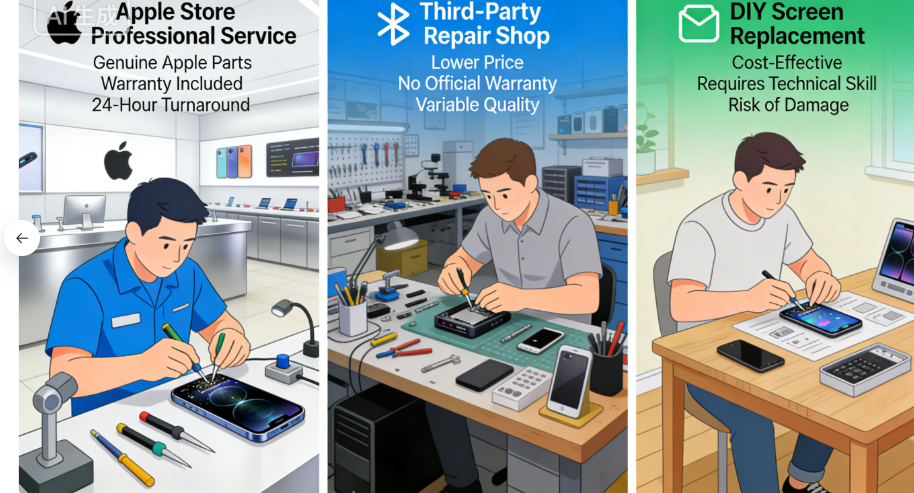
- Apple Official Service: Uses genuine parts, but you’ll pay a premium.
- Third-Party Shops: Often cheaper, though quality can be hit or miss.
- DIY Kits: The most budget-friendly, but one wrong move and… well, let’s just say it’s risky business.
🔹 How Bad Is the Damage?
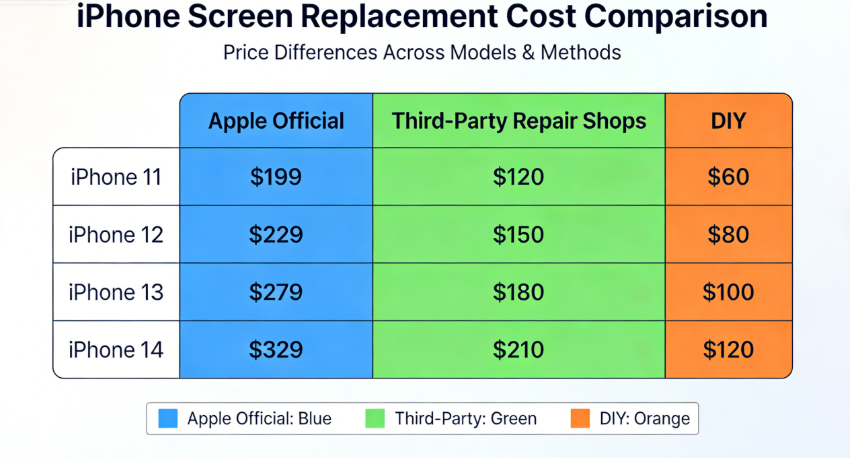
A small crack may only need glass work. But if the display is totally busted, you might need a full assembly swap—which bumps up the iPhone screen replacement cost real quick.
🔹 Where You Live
Labor rates and part availability vary by city and state, so your location can tip the scales.
Bottom Line:
Getting a clear picture of these factors helps you ballpark the iPhone screen replacement cost and choose the smartest fix. Whether you want the safety of Apple-certified service, the savings of a local pro, or the DIY thrill—you’ve now got the inside scoop.
Need more tailored advice? Drop your iPhone model and damage details—I’ll help you guesstimate!
Let’s Get Real: Your iPhone Model is the MVP in the Screen Repair Price Game.
Let’s cut to the chase—when it comes to the iPhone screen replacement cost, your specific model is the star of the show. It’s the difference between a “not-so-bad” bill and one that makes your wallet want to hide. Think of it like car parts; a sensor for a brand-new model always costs more than one for a classic.
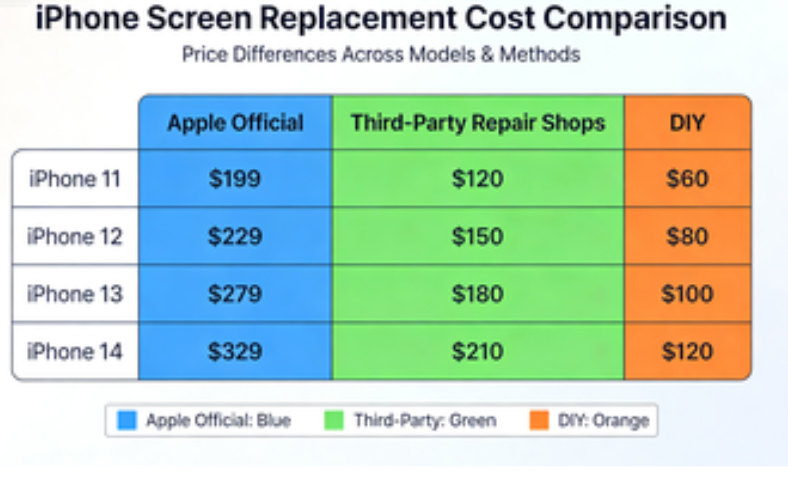
To help you navigate this, we’ve broken down the estimated iPhone screen replacement cost for popular models. Remember, these are ballpark figures for 2025. Your final price tag can still do a little dance based on your location and the repair shop’s vibe.
Your At-a-Glance iPhone Screen Repair Price Guide
Here’s the lowdown on what you might pay, whether you’re rolling with Apple’s crew, a trusted local technician, or feeling brave with a DIY kit.
| iPhone Model | Apple (With AppleCare+) | Apple (Out-of-Warranty) | Third-Party Shop (Avg.) | DIY Kit (Avg.) |
|---|---|---|---|---|
| iPhone 16 Pro Max | $29 | $379 | $180 – $320 | $90 – $160 |
| iPhone 16 Pro | $29 | $329 | $160 – $280 | $80 – $140 |
| iPhone 16 / Plus | $29 | $279 – $329 | $140 – $280 | $70 – $140 |
| iPhone 15 Pro Max | $29 | $379 | $180 – $320 | $90 – $160 |
| iPhone 15 Pro | $29 | $329 | $160 – $280 | $80 – $140 |
| iPhone 14 / 13 Pro Series | $29 | $279 – $329 | $140 – $280 | $70 – $140 |
| iPhone 12 / 11 Pro Series | $29 | $279 – $329 | $120 – $260 | $60 – $130 |
| iPhone X / XS Series | $29 | $279 – $329 | $120 – $260 | $60 – $130 |
| iPhone 11 / XR | $29 | $199 | $90 – $180 | $45 – $100 |
| iPhone 8 & Earlier / SE Models | $29 | $129 – $169 | $60 – $140 | $35 – $90 |
What’s the Story Behind These Numbers?
- AppleCare+ is Your Best Friend: See that beautiful $29 across the board? That’s the power of AppleCare+. It’s a no-brainer for peace of mind. Without it, the out-of-warranty iPhone screen replacement cost from Apple is the premium route—you’re paying for genuine parts and certified expertise.
- The Third-Party Sweet Spot: Local repair shops often hit the sweet spot between cost and quality. Their iPhone screen replacement cost is usually friendlier, but always ask if they use high-quality OLED or LCD replacements—especially for newer models. Don’t be shy to check reviews!

- The DIY Gamble: Going the DIY kit route has the lowest upfront iPhone screen replacement cost, but it’s a high-skill game. One wrong move with a tiny connector, and you might be shopping for a new phone. It’s for the brave and the steady-handed.
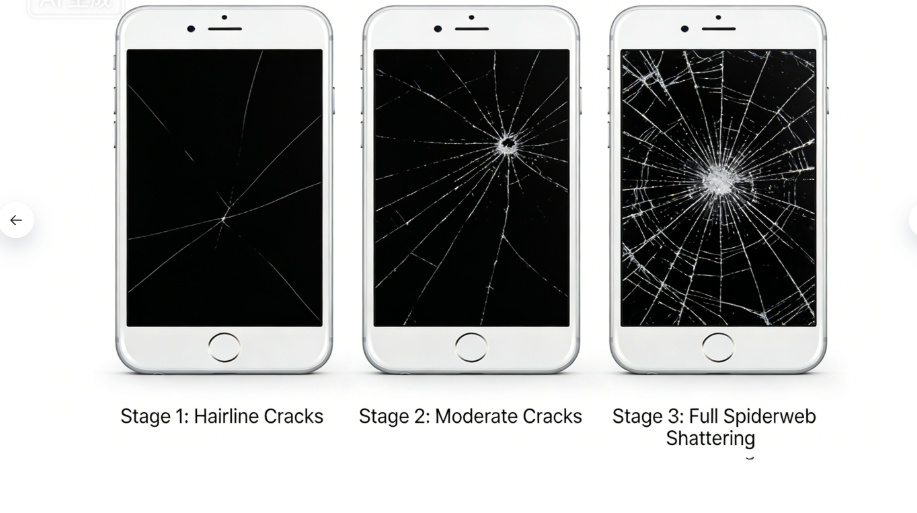
The Fine Print: Apple’s prices don’t include taxes and can vary by region. Third-party and DIY prices depend heavily on part quality (OEM vs. aftermarket). Always get a direct quote for your specific situation!
Bottom line: Your model dictates the starting line for the iPhone screen replacement cost. Whether you want the security of the Apple Store, the value of a local pro, or the adventure of DIY, this chart gives you the knowledge to choose wisely. Now, go get that screen fixed!
Alright, let’s break down your two main paths to a fixed iPhone screen. Think of it as choosing between a certified dealership and a trusted local mechanic for your car—both get the job done, but the experience, price, and peace of mind can differ big time.
Here’s a straightforward, personable look at your options.
Option 1: The Apple Official Repair Service – The “Official Fix”
The Deal:
This is the factory-authorized route. You’re getting genuine Apple parts installed by certified techs who live and breathe iPhones. It’s the gold standard for keeping your device’s soul—and all its fancy features—perfectly intact.
The Nitty-Gritty: Cost & Process
- The Cost:
- With AppleCare+: This is your “get out of jail almost free” card. $29 and you’re done for most screen repairs. (Just remember you paid upfront for the AppleCare+ plan itself).
- Out-of-Warranty: Here’s where the iPhone screen replacement cost gets serious. You’re looking at $129 (for an SE) all the way up to $379 for a Pro Max model. Ouch.
- Heads Up: Extra damage (like water) adds more. Mail-in repairs have shipping fees.
- The Process:
- Book It: Schedule online or walk into an Apple Store.
- Inspection: A tech will check your phone and give you the final price.
- The Fix: Done with real Apple parts. Things like True Tone and Face ID will work like they’re supposed to.
- Warranty: The repair itself is covered for 90 days, which is a nice safety net.
Pros & Cons: The Real Talk
Pros:
✅ Genuine parts = perfect performance. No weird glitches.
✅ Convenient with stores and providers everywhere.
✅ Repair is backed by a reliable warranty.
✅ Keeps your original device warranty intact.
Cons:
❌ The out-of-warranty iPhone screen replacement cost is the highest. You’re paying for the brand and peace of mind.
❌ Can involve appointments and waiting.
❌ Mail-in option means you’ll be phone-less for several days.
Bottom Line: Best for AppleCare+ members, perfectionists who want everything to work exactly as Apple intended, or anyone who needs to keep their original warranty alive.
Option 2: Third-Party Repair Shops – The “Local Expert” Route
The Deal:
These independent shops are the popular, often faster, and more wallet-friendly alternative. The catch? Quality can be a roll of the dice depending entirely on the shop you choose.
The Nitty-Gritty: Cost & Process
- The Cost:
- Average Range: Generally between $60 and $320. For example, an iPhone 11 might be $90–$180, while an iPhone 16 Pro Max could run $180–$320.
- Location Matters: Prices swing based on your city, the shop’s reputation, and what parts they have in stock.
- The Process:
- Do Your Homework: This is the most important step! Read reviews (Yelp, Google).
- Get the Fix: Many offer same-day service, sometimes in under an hour.
- Ask About Warranty: Shop warranties vary wildly—from 30 days to a year.
Pros & Cons: The Real Talk
Pros:
✅ Easier on your bank account than Apple’s out-of-warranty price.
✅ Speed demons—often same-day service.
✅ Great convenience if there’s no Apple Store nearby.
Cons:
❌ Quality varies. Non-genuine parts might mean worse color, touch response, or broken Face ID.
❌ Likely voids any remaining Apple warranty.
❌ Shop warranties aren’t as universally strong as Apple’s.
How to Pick a Good Shop (Your Checklist):
✔️ Stellar reviews are a must.
✔️ Ask about parts: Do they use high-quality OLED/LCD replacements?
✔️ Get warranty details in writing.
✔️ Technician certifications are a good sign.
Bottom Line: Best for budget-focused folks, people with older models, or anyone who needs a fast, local fix and is willing to research their shop.
Quick Comparison: Your Choice at a Glance
| Feature | Apple Official Service | Third-Party Shop |
|---|---|---|
| iPhone Screen Replacement Cost | Highest (without AppleCare+) | More Affordable |
| Part Quality | Genuine Apple | Varies (OEM/Aftermarket) |
| Repair Warranty | 90 Days / Remainder of AppleCare+ | Varies (30 Days – 1 Year) |
| Speed | Appointment-based; possible wait | Often Same-Day |
| Best For | Warranty, perfection, AppleCare+ owners | Budget, speed, older phones |
The choice is yours. Weigh the iPhone screen replacement cost against the value of guaranteed quality and convenience. What matters most to you?
Option 3: The DIY Screen Replacement Kit – For the Bold & the Handy
The Deal:
So you’re thinking of rolling up your sleeves and becoming your iPhone’s surgeon? DIY kits are the ultimate budget hack, turning your kitchen table into a repair shop. It’s the most hands-on way to tackle that iPhone screen replacement cost, but let’s be real—it’s not for the faint of heart. This is a high-stakes game of patience, precision, and steady hands.
The Nitty-Gritty: Cost & Process
- The Cost (The Big Appeal):
- Kit Range: This is where you save serious cash. Prices typically span $35 to $160. Think $35–$70 for an iPhone SE, or $90–$160 for an iPhone 16 Pro Max screen.
- Apple’s Official DIY Twist: Believe it or not, Apple now has a Self Service Repair program. You can rent their official toolkit for $49 and buy parts. They even give you a refundable credit (e.g., ~$33 for an iPhone 12) when you mail your old screen back. All-in, DIY costs can range from $35 to $200.
- The Process (The Adventure):
- Gear Up: Buy a kit from a trusted source like iFixit or Apple’s own program. A good kit has the screen, proper tools, and a killer guide.
- The Operation: This is where you follow the tutorial like it’s a sacred text. You’ll be dealing with tiny screws, delicate connectors, and stubborn adhesive. One wrong pry and you could kiss Face ID goodbye.
- The Moment of Truth: Power it on. Does the touch work? Are the colors right? Cross your fingers.
Pros & Cons: The Real Talk
The Upside:
✅ Rock-bottom iPhone screen replacement cost. The potential savings are huge.
✅ Major bragging rights and a real learning experience.
✅ Fix it on your own schedule, no appointments needed.
The Downside:
❌ High difficulty level. It requires technical skill; a simple slip can cause permanent damage.
❌ Almost certainly voids any remaining Apple warranty.
❌ Part quality is a gamble. Non-genuine screens can have worse brightness, color, or touch response.
❌ Apple’s official DIY kit is still a pricey route due to the tool rental.
Is DIY For You? Your Quick Checklist:
✔️ You’ve successfully repaired electronics before (think laptops, consoles).
✔️ You own the proper tools (or are willing to buy/rent them).
✔️ You’re comfortable watching a 30-minute tutorial twice before starting.
✔️ Your phone is out of warranty, or you’re okay with voiding it.
✔️ You understand the risk and have a backup phone, just in case.
Bottom Line: The DIY route is best for experienced tinkerers, fiercely budget-conscious users who accept the risk, and tech enthusiasts who find the process fun. It’s the most affordable iPhone screen replacement cost on paper, but remember: your time, stress, and the risk of a costly mistake are part of the hidden price.
Pro Tip: If you go DIY, spring for the highest-quality screen you can find and watch the entire guide first. Your phone will thank you.
Let’s Break It Down: Your Final Decision on iPhone Screen Repair
Alright, let’s lay all your cards on the table. Choosing how to fix your iPhone screen boils down to three paths—each with its own trade-off between cost, convenience, and risk. Here’s a no-nonsense, side-by-side look to help you pick your winner.
The Quick-Compare Cheat Sheet
| Option | Cost Range | Quality & Parts | Warranty | Time Commitment | Overall Risk |
|---|---|---|---|---|---|
| Apple Official | $29 – $379 (With/Without AppleCare+) | Highest. Genuine Apple parts. Full feature compatibility. | Strong (90 days or remainder of AppleCare+). | 1–7 days (Appointments + mail-in time). | Low. The safest, most reliable bet. |
| Third-Party Shop | $60 – $320 (Varies by model & location) | It Depends. Can range from great OEM-like to iffy aftermarket. | Varies (Typically 30 days – 1 year). | Same day – 3 days (Often very fast). | Moderate. Your research makes or breaks this. |
| DIY Kit | $35 – $200 (Kit + potential tool rental) | A Gamble. Highly dependent on the kit you buy. | Minimal (Usually just part warranty, if any). | 30 mins – 2 hours (Plus your personal time & stress). | High. One small mistake can lead to costly damage. |
The Key Takeaways (Straight Talk)
- Apple is the quality and peace-of-mind leader, but that comes at a premium price if you’re not covered by AppleCare+.
- Third-Party Shops hit the sweet spot of affordability and speed, but you’ve gotta do your homework to avoid sketchy repairs.
- DIY is the ultimate budget play, but it’s really only for the confident, tech-savvy crowd who can stomach the risk.
Don’t Forget These Game-Changers
Before you decide, weigh these final factors:
- Is AppleCare+ Worth It? At $149–$199 for two years, it’s a no-brainer if you’re accident-prone. It transforms that scary iPhone screen replacement cost into a predictable $29 fix.
- Warranty & Future Value: Using non-genuine parts can void your remaining Apple warranty and might hurt your phone’s resale value down the line. An official repair receipt from Apple is gold for future buyers.
- Repair vs. Replace: For older models (like an iPhone 8 or SE), ask yourself: does the repair cost come close to what my phone is even worth? Sometimes putting that money toward a newer model makes more sense.
Your Action Plan: What Should YOU Do?
Go the Apple Route If:
- You have AppleCare+ (use it!).
- Keeping your full warranty and resale value is a top priority.
- You only trust genuine parts and certified technicians.
Pick a Third-Party Shop If:
- You’re out of warranty and want to save money.
- You need a fast, same-day fix.
- You’re willing to research and choose a highly-reviewed, reputable local shop.
Attempt the DIY Fix If:
- You’re technically skilled and have repaired electronics before.
- Cost is the absolute deciding factor and you accept the risks.
- You find the process interesting and have a good guide (like iFixit or Apple’s Self Service program).
The final word: Check your warranty, get a couple of quotes, and honestly assess your skills. Whether it’s the premium, the balanced, or the budget path, making an informed choice is the best way to get your iPhone back in action without any regrets.
Got a cracked screen story or a question? Drop it below—let’s chat!







Recent Comments